

IN VECTORWORKS 2026, THE CONCEPT OF DEPTH becomes more than a visual flourish—it evolves into a design language. The new Depth Cueing system redefines how architects and interior designers perceive space through 3D drawings, delivering an industry-leading integration of vector and raster graphics in a single viewport.
“It ties into the Vectorworks advantage,” explains Darick DeHart, chief product officer at Vectorworks. “Our feature is both vector- and raster-based, and that ties into the complications of developing it. But our hidden-line output is completely vector-based—so the depth cueing there is based on line weight.”
That statement signals a quiet revolution that advances the state of the art in BIM and CAD graphics. While most BIM platforms—Autodesk Revit among them—approach depth cueing as a purely raster-based fade, Vectorworks’ dual-engine system adds precision and control at the line level. It allows designers to fade or taper lines as they recede in perspective, layering that atop pixel-level transparency or fade-to-white effects.

Designers can bring instant clarity and spatial depth to their drawings with automated Depth Cueing in Vectorworks 2026. Line weights, tonal values, and pixel transparency adjust dynamically based on object distance in both Hidden Line and Shaded viewports, reducing the need for manual adjustments. Image courtesy of Vectorworks.
The result is not just image-making—it’s the fusion of drafting and rendering into one expressive continuum.
Two Renderings, One Vision
This duality—vector clarity meeting raster richness—has long been part of Vectorworks’ DNA. In 2026, it reaches a new synthesis.
“When you have a viewport, you can have a foreground rendering and a background rendering,” adds DeHart. “It’s literally two renderings in the same viewport.” The company’s viewport technology has always offered a layered rendering pipeline, but 2026 refines how both halves communicate.
“The types of viewports that our users really leverage this dual-rendered technology are in rendered exterior elevations and 3D sectional views,” notes Rubina Siddiqui, senior product marketing director.

Dual-rendered viewports combine crisp vector linework with rich shaded textures—allowing designers to convey structure and atmosphere in a single unified image. Image courtesy of Vectorworks.
For users, it means a drawing that breathes—line work conveying structure, shaded color carrying atmosphere. The new sliders for both raster and vector depth cueing give intuitive, non-technical control. Fade to white, fade to transparency, and taper lines by distance are all accessible to users in seconds.
“Other products have depth cueing, but the combination of raster and vector is unique,” DeHart continues. “When you compare our raster to others—like Revit—their depth cueing just fades out. In Vectorworks, pixels can fade to white, or there’s transparency at the pixel level.”
When you compare our raster to others—like Revit—their depth cueing just fades out. In Vectorworks, pixels can fade to white, or there’s transparency at the pixel level.
It’s a seemingly small distinction with large consequences: nuanced legibility without technical friction. Advanced graphics remain accessible—even to first-year users.
Healthy Files, Healthy Models
If Depth Cueing speaks to visual sophistication, the new File Health Checker speaks to model integrity.
“A simple thing is maybe an object that’s made out of a lot of tiny line segments,” DeHart explains. “The Health Checker is going to try to compose it for you.” Every longtime experienced Vectorworks user knows exactly what DeHart is talking about in that statement. These kinds of issues exist in all CAD programs, but the company has turned its attention seriously to giving users the power and automation to optimize the health of their files.

The new File Health Checker palette automatically scans, flags, and resolves common geometry and resource issues, helping maintain clean, high-performing models. Image courtesy of Vectorworks.
The new palette automatically scans, flags, and—in many cases—fixes common issues that slow performance or corrupt geometry. With a checklist interface, each flagged item links directly to its location in the drawing.
The system currently runs fifteen diagnostic tests grouped under Geometry, Settings, and Resources—from far-from-origin objects to overly dense polygons or complex hatches. One specific handy health check will be to find issues with Vectorworks files that have very large texture sizes or high hatch complexity. Both fall under Resource checks, but they add file-size bloat and can frustrate users.
“Importing Revit files from consultants and dealing with complex hatches are some examples,” says Siddiqui. “Those are the kinds of things that do get flagged with the Health Checker.”
While it’s not a Solibri-style model audit tool, its extensible design hints at potential. “This was designed to be expanded,” DeHart notes. “It could evolve in that direction, but I think it will instead evolve to be supportive—kind of like tech support, helping users find common problems.”
Hugues Tsafak, vice president of product development, adds that the underlying platform was intentionally built for scalability. “It could evolve into something more like Solibri if we felt that was the right direction,” he says.
Marionette, Python, and Clean APIs
Beyond visualization and health, Vectorworks 2026 continues its quiet modernization under the hood. Marionette, the company’s visual scripting environment, receives updates that keep it aligned with the core SDK.
“It mirrors and builds on our SDK,” DeHart explains. “With every version of new SDK calls, Marionette must also be updated. We cleaned up some older calls and added newer Python libraries.”
Marionette remains fully Python-based, maintaining a bridge between parametric modeling and open-source extensibility—an ongoing nod to Vectorworks’ philosophy of designer empowerment rather than constraint.
Sustainability Dashboard
Vectorworks 2026 also introduces a Sustainability Dashboard, a visual platform that unites three new sustainability tools with the existing Embodied Carbon Calculator.

The Sustainability Dashboard transforms project data into visual insight, uniting embodied carbon metrics and new sustainability tools for early-stage, data-driven design decisions. Image courtesy of Vectorworks.
“This is also a platform that could be developed more in the future,” DeHart says. “It complements our worksheet technology. It pulls data from the model like worksheets can do, but in this case, it’s a more graphical representation.”
The Dashboard transforms numeric worksheets into visual insight—bridging performance analytics with design storytelling. “It’s all part of our data strategy,” DeHart adds. “The goal is that all objects can report things to worksheets so you can utilize and check for appropriate data.”
The Embodied Carbon Calculator itself remains grounded: volumes of materials multiplied by published coefficients from university research tables established for industry standards. But placed within a dashboard, that information becomes both quickly communicative and actionable—an early signal of Vectorworks’ intent to visualize sustainability data as fluidly as it does geometry.
Assemblies, Attributes, and Fine-Grain Control
Another subtle yet significant advancement in 2026 appears in door and window assemblies. Designers can now combine windows and doors into unified units with shared sills and apply distinct graphic attributes at different detail levels. The ability to create and manage mixed assemblies enables architects to undertake larger projects, particularly when facades feature complex arrangements of doors, windows, panels, and even wall segments.
Siddiqui gives us a good example of the use of mixed assemblies in retail architecture, specifically storefronts. By combining discreet doors and windows, users can better manage, edit, and position these elements within their building’s wall systems.
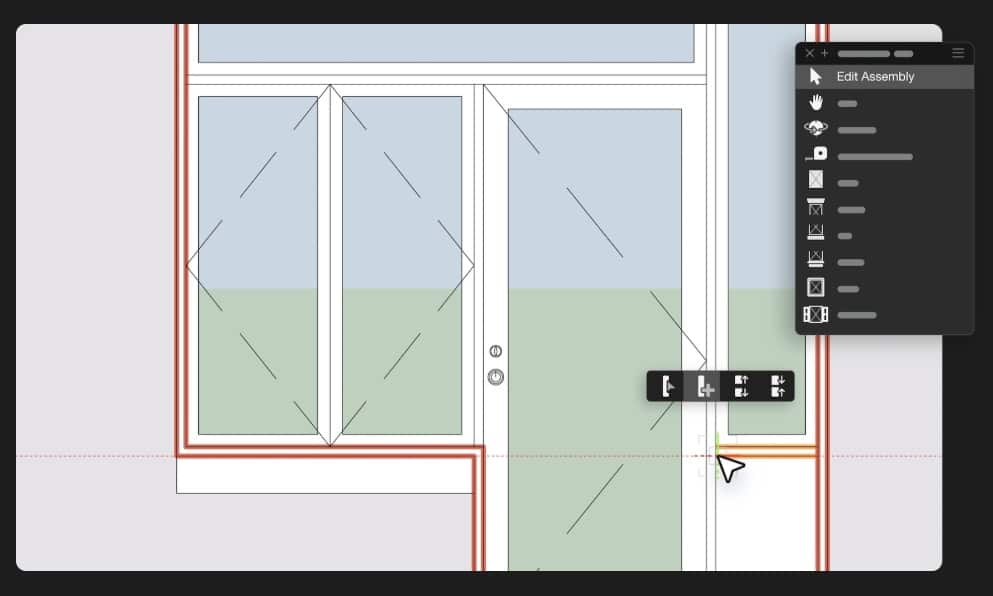
Mixed assemblies are now easy to create, edit, and manage, including with styles. They can also include panel wall segments.
Related to the mixed assembly technology, Vectorworks 2026 also adds more granular control over the 2D graphics of 3D BIM elements in doors and windows. “Previously, you had one attribute for the sill,” DeHart explains. “Now, if the sill is visible in low detail, you can define those attributes separately. “It’s just greater control over the graphics of what you see.”
Tsafak elaborates: “It’s giving you more fine-grain control over the graphic attributes at 2D levels of detail.”
This refinement epitomizes Vectorworks’ long-held belief: control should expand without complexity. Attributes now appear in tabular form—clarifying relationships between components and detail scales.
Smarter Worksheets and Adaptive Tables
For architects and landscape designers alike, worksheets remain mission-critical tools in their arsenal. This release introduces an elegantly simple solution to a persistent problem: breaking large tables across sheet layouts. Part of the core updates in Vectorworks 2026, users can now slice their worksheets, position multiple slices each with header rows, and automatically set resizing layout capabilities.
“Before, users would use viewports to capture different parts of a table,” Tsafak explains. “As tables grew, they had to go back and adjust those viewports. Now that problem goes away.”
“You can slice the worksheet and position the parts where you need—they auto-adjust as tables grow or shrink,” he adds.
Before, users would use viewports to capture different parts of a table. As tables grew, they had to go back and adjust those viewports. Now that problem goes away.
DeHart confirms that the improvement originated with architects but benefits every discipline. It’s one of those little-big features that define usability maturity.
Cloud Intelligence and Revit Interoperability
Vectorworks 2026 also extends its Cloud Services capabilities—pushing more workflows into high-performance remote processing.
“We’ve always used cloud processing for export,” DeHart notes. “But now we have import. We have Revit import processing on the cloud and IFC import processing in the cloud.”
This dual-direction approach means time-consuming file translation now runs off-machine—saving local resources and ensuring compatibility. Siddiqui explains why it matters: “We need to support all those stages between Revit versions. The ODA library allows us to do that.”
“Technically, it’s quite interesting,” DeHart adds. “Even the ODA library is set up to support a particular version, but on the cloud—because we have more control—we can switch libraries dynamically for whatever version we need.”
It’s a nuanced engineering feat that directly benefits architects juggling consultant models across staggered Revit cycles. But it also gives Vectorworks-based architects a killer advantage because dealing with multiple Revit versions and older versions is a pervasive challenge in the industry that the company has mastered via cloud computing.
Tsafak explains: “There are things that you can do in the cloud that you can’t do anywhere else.”
Final Thoughts: A Usability Renaissance
Beyond headline features, the 2026 release is filled with user-experience refinements: floating contextual control improvements, enhanced Quick Search, and the newly refined worksheet UI treatments beyond the splicing features.
“There are a ton of little UI updates that make the program just so much nicer to work with,” Siddiqui says. “Longtime customers will really notice.”
In aggregate, these refinements mark a maturity phase: Vectorworks advancing not only in capability but in coherence—how the pieces fit together into a seamless creative environment.
There are things that you can do in the cloud that you can’t do anywhere else.
Depth Cueing, File Health Checker, Sustainability Dashboard—all reflect a singular trajectory: technology tuned to human perception. Vectorworks 2026 isn’t about complexity for its own sake. It’s about allowing designers to think visually, reason spatially, and act confidently—whether drawing depth or data.
When asked what new features they are most excited about for users, DeHart doesn’t hesitate. “We think the worksheet splitting is really exciting,” he says, smiling. “It just fits so nicely into existing workflows.”
And that may be the defining phrase for this release—fit. Depth where you need it, intelligence when you want it, and an interface that feels ready for whatever design futures emerge next.