
VECTORWORKS ARCHITECT 2026 IS A COMPREHENSIVE CAD and BIM platform aimed at professional architects, interior designers, and urban designers. With Vectorworks Landmark 2026, the software is highly regarded among landscape architects, garden designers, and urban design and planning professionals. In this review, we will be focused only on Vectorworks Architect 2026.
The 2026 release refines its multi-disciplinary approach by integrating 2D drafting, 3D modeling, rendering, and data management within a single environment. Its hybrid modeling system allows users to move fluidly between conceptual sketches and detailed construction models, while maintaining compatibility with industry standards such as IFC, DWG, and Revit files.
The latest version introduces improved graphics performance, faster section and viewport updates, and enhanced AI-driven drafting aids that automate routine layout and annotation tasks. A reworked resource browser and more consistent UI elements make file management and navigation smoother.
The integration with Twinmotion and Enscape continues to strengthen real-time visualization workflows, supplementing Maxon Cinema4D native online rendering.
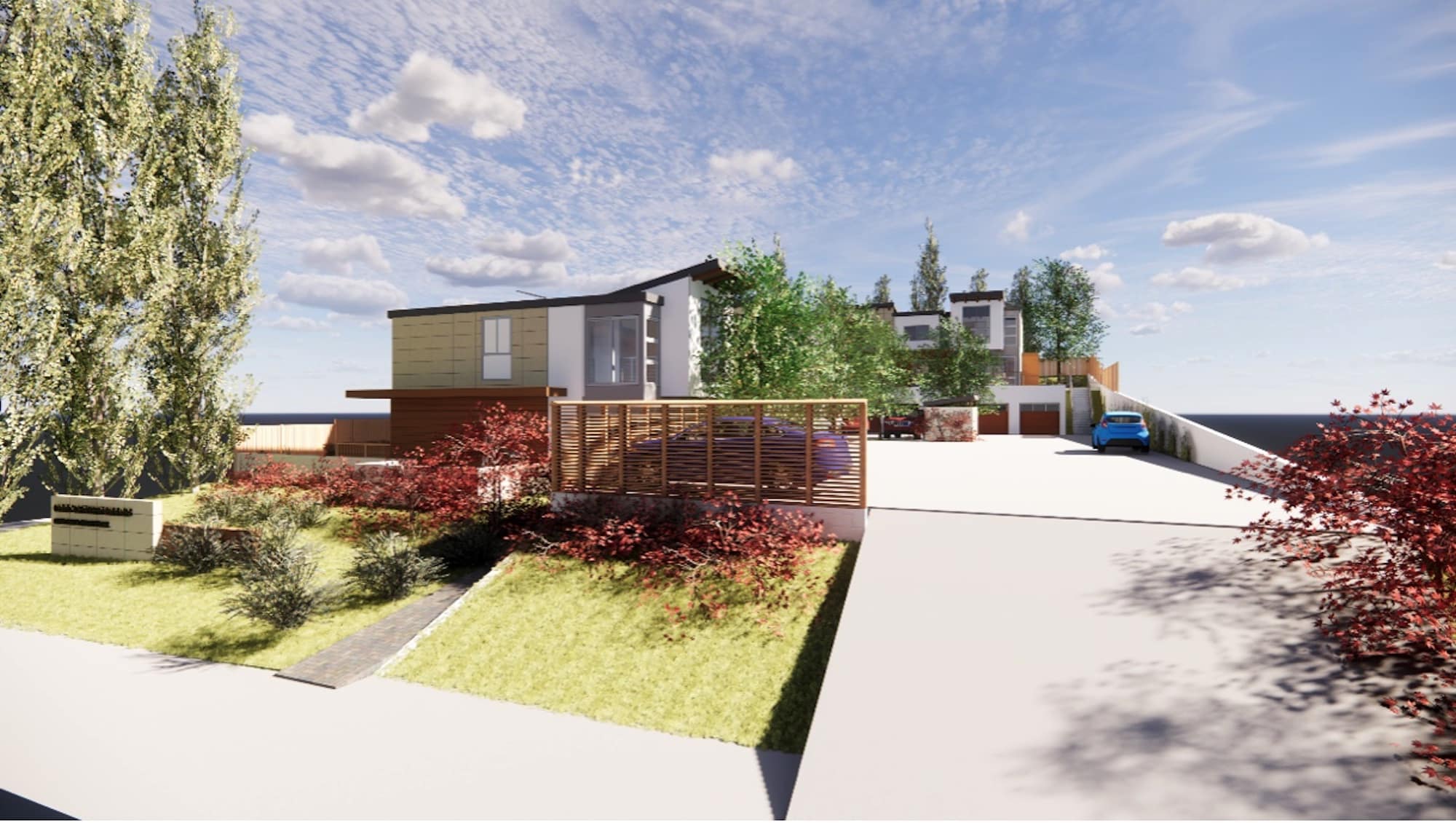
A Vectorworks Architect scene (created by the author) rendered using Enscape Renderer, which can live sync with the BIM solution.
Overall, Vectorworks Designer 2026 is a highly flexible design tool, appealing to users who value versatility and independence from more rigid BIM ecosystems. Its strength lies in combining creative freedom with increasingly capable BIM functionality.
This review focuses mostly on its use in the architects’ office but its capabilities in interior design, landscape design, lighting design, and site design make it especially useful for firms with multiple disciplines in the office framework.
Vectorworks Overview
Vectorworks was originally developed in the 1980s as MiniCAD on the Mac platform. It began its journey as a 3D modeling program and one of the very first high-quality professional CAD and 3D modeling software systems for the burgeoning MacOS platform. By the mid-1990s, MiniCAD had quickly become a favorite CAD tool for architects around the world, from the UK and US to Switzerland and Japan, architects on the Mac loved its famed ease-of-use and conformity to the Apple MacDraw UI way of doing things. The software became famous for how easy it was to use, but also for its graphical capabilities. All of those things remain today.
For architects on Vectorworks, they have long enjoyed the software’s hybrid 2D/3D nature, including its BIM-orientation in the last decade of its development. Architects feel the tool works the way architects want to work. It conforms to a WYSIWYG philosophy. The final product for architects is construction documents in sheet sets, and what you see is what you get in Vectorworks. Using its viewports technology, drawing sheets are composed (or pasted up) onto sheet layers (equal to paper space in AutoCAD lingo). Viewports enable users to zero in on exactly the parts of drawings and 3D BIM models they want to show on composed drawing sheets, setting scale and visualization attributes governing line weights and foreground and background rendering options (more on that later). Users can also copy and paste in image files (jpegs, etc), PDFs, and text to fully compose sheets as they want them to be.
For those who don’t know Vectorworks Architect, let me summarize at a high level its features:
Drafting and Modeling
- Comprehensive 2D drafting and sketching tools.
- Push and Pull 3D Modeling Tools (similar to SketchUp) but using solids modeling.
- Advanced Parasolid-based 3D modeling tools: Solid modeling, NURBS modeling, Direct and Parametric editing features.
- Conceptual and massing modeling workflows for early design.
Vectorworks Architect’s modeling toolset is built on the world’s best 3D geometry kernel (Parasolids) and enables architects’ comprehensive freeform modeling capabilities once they have invested in the training.

A freeform modeling example from a project by the author, using Vectorworks’ native rendering capabilities.
As an example of freeform modeling, the image above of a bell tower shows a simple example of what is possible with the program. Textures can be added to supplement those already included in the program, or they can be created from sources such as photographs of natural materials.
BIM and Data Management
- Comprehensive BIM authoring environment with IFC import/export functionalities.
- Extensive file exchange features, including Revit, SketchUp, Rhino, and AutoCAD.
- Fully parametric intelligent building objects (walls, doors, windows, roofs, etc).
- Automated worksheets and reports from BIM objects.
- Dynamic data assignment and data visualization.
- Materials, accurate quantification, and embodied carbon energy tracking.
While the youngest true BIM solution in the Nemetschek Group’s arsenal of BIM platforms, Vectorworks Architect 2026 has at times led the BIM industry in various leading-edge BIM capabilities, as we will discuss again in this review with its advanced Depth Cue features. But beyond its famed graphics capabilities, Vectorworks today is the only BIM solution on the market that can enable users to export backward to previous Autodesk Revit versions, and it offloads (and automates) those tasks to Vectorworks Cloud servers.
Documentation
- Automatic sections, elevations, and details.
- Sheet layers and the industry’s most advanced viewport technologies.
- Smart title blocks and revision management.
- Advanced dimensioning and annotation tools.
- PDF, DWG and export options.
Vectorworks’ title block technology has been around for awhile, but it shouldn’t be forgotten. Once installed, changes to the title block are automatically applied to all sheets. It is a big time saver and helps eliminate mistakes. Change an issue date, or a name, any change in the title block, and all 200 sheets are updated instantly. No one has to go through each sheet and update it.
Visualization
- Real-time shaded views and Redshift rendering.
- Renderworks (Cinema 4D engine) for photoreal output.
- Integrated Enscape, Lumion, and Twinmotion via LiveSync rendering.
- 3D perspectives, animations, and presentation boards.
- Real-time walkthroughs in 3D for client presentations.
Real-time shaded views are not so unique to Vectorworks, but the program executes them very well with its many onboard rendering engines and options. Its visualization strengths make designing fun and can make a project come alive for clients. Users can fly around, zoom in, zoom out, and see how all the parts of a design fit together, discover issues and conflicts, and then resolve them.
Collaboration, AI, and Automation
- DWG, RVT, IFC, and SKP import/export.
- Multi-user Project Sharing.
- Vectorworks Cloud Services.
- AI command and tool search.
- Early-stage auto-dimensions and drafting assistant.
- Python scripting and Vectorscript.
- Marionette visual scripting (like Grasshopper) for custom parametric object creation and manipulation.
It should also be said that Vectorworks Cloud has numerous automation features where users can offload time-consuming processes from import and exporting to and from Revit, to stakeholder file sharing with markup capabilities and more.
Vectorworks Architect 2026: What’s New
AI Tools in Version 2026
Vectorworks 2026 introduces new AI (artificial intelligence) features, among them updates to its previous AI technologies. These moves mark the company’s first substantial step toward machine-assisted design within a CAD/BIM environment.
Vectorworks AI Visualizer was previously released back in 2024, but has received enhancements in version 2026. The latest improvements boast faster editing and image quality, particularly sharper image quality, a new dark mode, and a cleaner layout with tooltips. Vectorworks AI Visualizer is an integrated generative tool that produces conceptual imagery directly from project data or text prompts. It enables designers to explore massing, lighting, and material concepts early in the design process without leaving the application or relying on third-party rendering software. This feature bridges the gap between sketching and visualization, accelerating the transition from idea to form.
MORE: Deeper Dimensions—Vectorworks 2026 Redefines BIM Visuals and Data
Complementing that is the Vectorworks AI Assistant (Preview), a context-aware help system built on a proprietary dataset rather than general web content. It interprets user queries in plain language, identifies relevant commands or workflows, and provides direct links or actions inside the software. This is a great tool for new users or anyone not familiar with recent updates.
Overall, Vectorworks 2026’s AI features remain in an early stage but are distinctly purpose-built. They emphasize augmenting design thinking and workflow efficiency rather than replacing manual drafting.
New Depth Cueing
The new Depth Cueing features give elevations, sections, and 3D views a sense of depth. That is one way to look at it; another way is that it allows one to focus on a particular area of the building or space. One can show a rendered elevation that shows the part of the building behind the elevation faded, so the viewer focuses on the important part. At first, it seems mostly for presentations. As always, a picture is worth a thousand words/text. Even in construction drawings, pictures make the project easier to understand.
So rendered elevations, sections, and interior views don’t have to be just for client presentations; they can also be part of the construction documents. Depth cueing adds a new way of looking at the project. It is fairly easy to use. Of course, the first step is an accurate model. Scrolling around the model in shaded view makes finding the right view easy and fast, or one can just pick a simple front or side view. A viewport is made and placed on a sheet layer. It can be rendered in color/shaded or hidden line. Then, from object info, select background rendering and depth queuing becomes an option. Here, sliders let you adjust the depth of the fully rendered area and the background fade. The truly interesting feature is that this view is not just a bitmapped image but also includes vector lines.

Depth cueing in action on the author’s residential project showing the atmospheric and depth-producing qualities of the new features.
There are several selections to be made: textures, colors, anti-aliasing, and whether to draw edges on or off. Selecting draw edges does just that; the lines can be thickened to emphasize the building outline as a viewport, and one can then add notes and dimensions. While it may seem primarily a presentation feature at first, it can be used to create highly informative elevations and sections. It also needs to be mentioned that shaded views are very light; they add very little to the file size. Here is a tool that will be used on projects large and small, though bigger models will require longer processing times.
2D Detailing for Walls, Doors, and Windows
This makes the link between 3D and 2D drawings much tighter. One can now control how doors, windows, and walls display at different levels of detail with far more granular control. This means fewer redlines, fewer inconsistencies, and less time cleaning up.
Door and Window Assemblies Tool
This new feature is a new way to combine doors, windows, panels, and wall infills into one parametric object. If you’ve ever struggled to model complex openings and then had to patch them together in 2D, this will make life easier. It is not just a 2D tool; it’s a powerful 3D smart component for your more complex facades and storefronts.
Worksheet Improvements
Worksheets can now be sliced, linked, and spread across pages with better headers and formatting. For big projects with long door or window schedules, or apartment types, this makes documentation cleaner and easier to manage. It is also worth noting that on many projects, Excel is used to generate large lists of items such as apartment types and features, schedules, and code compliance requirements.
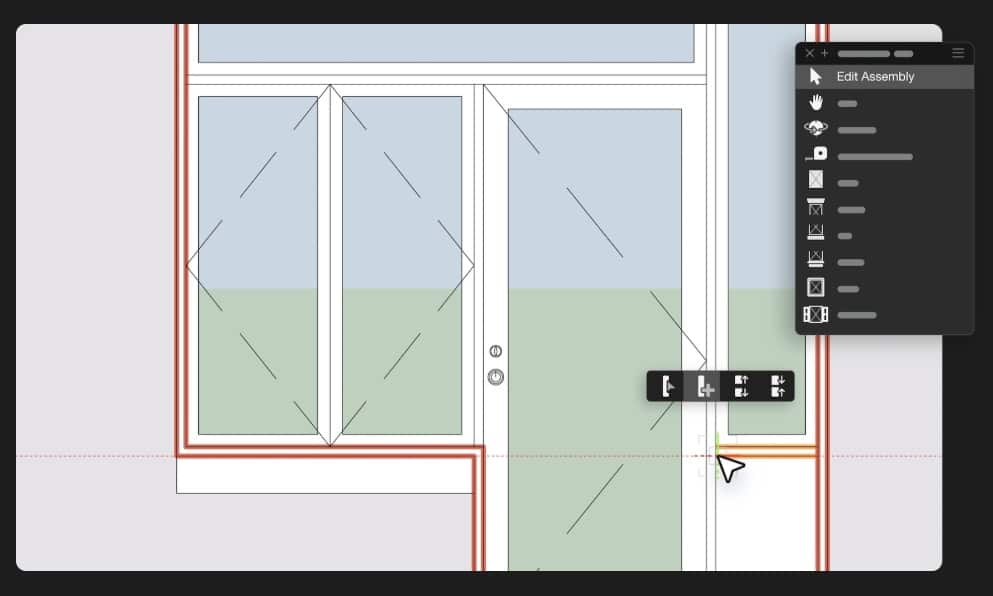
Mixed assemblies are now easy to create, edit, and manage, including with styles. They can also include panel wall segments.
These large Excel worksheets—which can have live-links to the native Vectorworks worksheets and work bi-directionally across both Windows and Mac platforms (a feature no other BIM tools have built in)—can take up pages in length. In the past, users would use the program’s viewport features to manually split them into parts and arrange them on sheets. This is no longer necessary with the new splice feature. And when you splice a worksheet, its fixed header rows can automatically appear at the top.
File Health Checker
Think of this as a diagnostic tool for your project files. It finds hidden geometry and inefficiencies and suggests cleanup. (see image below). Large files will stay lighter and more stable. Note: this feature is only available to subscription users. Probably worth the price of a subscription by itself. Large files with lots of junk in them can wreak havoc on your workday, causing computer crashes and corrupted files.
Cloud Processing for Revit Imports
If you work with consultants who send big Revit models, you’ll appreciate this. Instead of tying up your computer while the file imports or exports, you can offload the work to Vectorworks Cloud Services and keep working. And here is something that is unique to Vectorworks.
Vectorworks Cloud can import or export to various past versions of the Revit file format, making it a cloud-based automated pipeline for handling a range of Revit file formats. This is huge because Revit itself is only “forward compatible,” meaning it can generally open older versions, but even then, there can be issues. However, Revit has no “Save As” function to save a file to a previous version. Welcome, Vectorworks Cloud, to the rescue. If a Vectorworks firm receives a Revit 2024 file, they can use Vectorworks Cloud to export backward to an earlier version without issue.
Massing Model Enhancements
There are a small number of meaningful 3D modeling updates that offer more flexibility in early design phases, especially for mixed-use buildings. Floor heights and usage data can now be applied right in the massing model, making feasibility studies more realistic.
Sustainability Dashboard
This is a brand-new tool that tracks embodied carbon, biodiversity net gain, greening factors, and more. It is discussed in length in this Architect feature here. Not every office will use this right away, but it’s a clear step toward meeting regulatory requirements and client expectations on environmental performance. Now, a requirement for large projects in California, for example. Preparing a true sustainability report is time-consuming because all project materials must be documented.

The new File Health Checker palette automatically scans, flags, and resolves common geometry and resource issues, helping maintain clean, high-performing models. Image courtesy of Vectorworks.
This tool will make it easier, but it is likely to be used primarily by consultants or large firms in the more immediate future.
So those are the major new features in Vectorworks Architect 2026. The Sustainability Dashboard is a rather bigger deal than just its application to sustainability and green building. The reason is that the Maryland-based BIM-CAD company created a foundational new software platform for taking any kind of data in a Vectorworks file (specifically object data or data attached to objects) and enabling a new way to visualize it. Today, it is sustainability data, but in the future, Vectorworks users will likely be able to craft their own custom dashboards around data that is exactly meaningful to them.
Vectorworks for Large Firms
One area that needs to be cleared up is the perception of Vectorworks as a “small-firm tool”. In the United States, especially, this is an outdated view. Globally, Vectorworks-based international and design-oriented practices scale successfully to the enterprise level and are a mainstream BIM platform. You can read about some of them in case studies here. One such global enterprise is Starbucks‘ internal design and development division. While not well-known, this publication has been aware of this Fortune 500 enterprise’s use of Vectorworks for years.
In several regions—particularly parts of Europe and Japan—Vectorworks holds a major share of the architectural market. In Germany, Austria, Switzerland, Australia, and Japan, Vectorworks Architect is widely used as a primary BIM platform by architects. The reasons are largely cultural and technical: these markets favor flexible, design-driven workflows and open BIM interoperability (IFC and BCF standards), which Vectorworks has emphasized for more than a decade. These markets don’t suffer from the negative network effects germane to markets with a near-monopoly solution.
Closing Thoughts and Recommendations
Vectorworks Architect 2026 doesn’t reinvent the program; it refines it in ways that directly benefit its users. There has been a considerable amount of code work in the past year applied to foundational capabilities that will help roll out new abilities in the near future (such as the tech behind the new Sustainability Dashboards).
Vectorworks continues to cede no ground to competitors in the domain of “graphics abilities.” The new Depth Cueing technology is unique and ahead of the industry. Drawings look better, data is cleaner, and files are more stable—especially now, thanks to the new File Health Checker.
In terms of recommendations? For offices already invested in Vectorworks, these are meaningful improvements. Vectorworks remains a flexible, all-in-one tool that balances design freedom with robust BIM and documentation. Part of the appeal of Vectorworks is that users aren’t supposed to start a project in Rhino or SketchUp as they do in Revit-based offices. Vectorworks’s Parasolid-based geometry kernel, paired with built-in Push-Pull modeling, sketch to modeling features, and Python-based Marionette (remember, this is like Grasshopper scripting) algorithmic-aided design (AAD) features, means users have everything they need in one tool.
For many architects around the world, that’s a combination that is hard to beat.
Pros
- Integrated 2D + 3D workflow. Strong hybrid drawing system. You can sketch, model, and document in one file without leaving the environment.
- Design-centric modeling. Freer geometry creation than Revit or Archicad. Easier to iterate conceptually or produce presentation models.
- Depth cueing and new 2D detailing tools make drawings look better with less effort.
- Door & Window Assemblies simplify complex modeling.
- File Health Checker (subscription only) and cloud processing keep large projects manageable.
- Sustainability Dashboard helps prepare for environmental regulations.
- Worksheets and reporting are easier to manage on big projects.
- Built-in rendering. Cinema 4D-based Renderworks is included, so photorealistic output needs no external engine.
- The integration with Twinmotion and Enscape provide real-time visualization workflows.
- Cross-disciplinary scope. One package covers architecture, landscape, lighting, and interiors. Attractive to firms that handle multiple project types.
- Lower cost of entry. Subscription price is below Revit or Archicad, enabling firms to apply those savings to more powerful hardware.
- Simpler licensing and independence. Works offline, no enforced cloud tie-in.
Cons
- Requires decent hardware, which may not be cost-effective for larger firms with many employees doing simple tasks.
- Some advanced features, like file health checker and AI help, require a subscription, and cloud services available to all are limited without a subscription.
- In the North American market, there are fewer consultants using open BIM workflows, and this gives Vectorworks users a bigger challenge.
- Speed and stability on large BIM models. In the domain of handling extreme geometry and full multidisciplinary BIM at scale, Vectorworks tends to perform slightly behind ArchiCAD (for architecture-centric large models) and behind Revit (for large team/collaboration-heavy BIM).
- Full-cycle BIM data management. Vectorworks has strong 3D modeling and documentation, but weaker parameter consistency and object-based data integrity.
Advice: The new Depth Cue features make this a must-have update for existing users who are heavily leveraging Vectorworks’ 3D and BIM capabilities with rendered views. And the same can be said for users leveraging Vectorworks’s worksheet tools. For folks only thinking about using Vectorworks or considering it more for a 2D architectural environment, we have said this before that no other program offers this much in features and capability for the cost. At the value level, Vectorworks leads the industry’s top tier.
Price: Depends on licensing type, including monthly, annual subscription, and Service Select membership. Vectorworks Architect is USD 1,530 per year. Click here for more info.

Volume of New Content = 4 — The volume of new features in this Vectorworks Architect release is less than in recent annual updates, likely due to foundational technology development time, such as the tech behind the new Dashboard technologies.
Quality of Execution = 4.5 — As usual, most of the new features are beautifully executed, including the new worksheet splitting feature, a favorite of the company’s staff. The author notes that Vectorworks does require robust hardware for the best performance on larger models. Improvements to the Vectorworks Graphics Module (VGM) are ongoing. Architosh does not have a performance test method for Vectorworks.
Underlying Technologies = 5 — Vectorworks Architect 2026 supports both Windows and MacOS at advanced levels—meaning it leverages OS-specific technologies to optimize performance across graphics and underlying OS features. The BIM platform is also built on Parasolid, the world’s most advanced industrial-strength modeling kernel (engine). And its mobile tool (Nomad) is built on Unity, which is Apple’s choice behind its Apple VisionPro headset. Vectorworks has the most modern (young) code base in the entire top-tier BIM industry for BIM 1.0 era (desktop era) tools.
Future Proofing = 4.5 — Its underlying technologies are particularly advantageous to leveraging future Windows on ARM mobile computers, along with changes to Windows CAD and BIM solutions that are moving away from OpenGL to combinations of DirectX or Vulkan. Vectorworks’s underlying VGM gives the company flexibility to optimize OS-specific graphics APIs on both Mac and Windows.


